How to enable Deduplicate Audit Logging
The Plauti Deduplicate Audit Logging feature is available in the Premium Edition.
Deduplicate Audit keeps track of all actions performed by Plauti Deduplicate, such as merged records by your users. Learn how to enable Audit Logging and work with it in this article.
Step 1 Enable Deduplicate Audit
Navigate to Deduplicate Setup page
At left, choose 'Settings' > tab 'General'
Find the 'Audit Logging' feature and enable it. Example image below:

Step 2 Working with Deduplicate Audit Logging
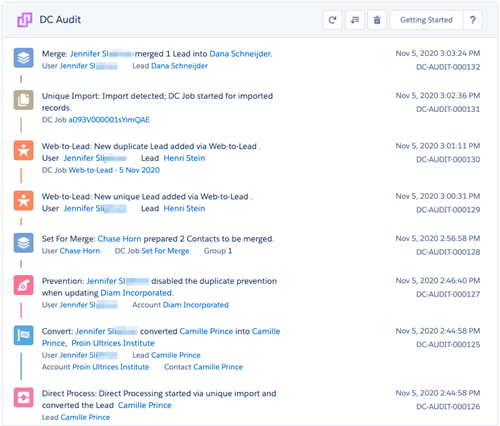
After you enabled Deduplicate Audit logging, Plauti Deduplicate will log all activity at the Deduplicate Audit page. Navigate to 'Deduplicate Setup' page, and at left click on 'Audit Logging'. Check the example image below to see how Deduplicate Audit looks:
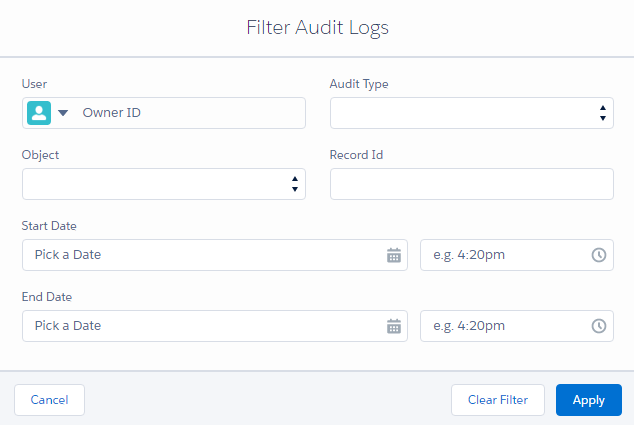
It is possible to apply a filter in the Deduplicate Audit logs. At the top you'll find several filter fields.
Select your filter criteria and hit 'Apply' to filter Deduplicate Audit log results. Example image: