

Create an email notification for every time a Deduplicate Job is completed
Last updated
Follow the steps below to set up email notifications to be sent every time a Deduplicate Job is completed.
1 Create Email Template
First, create a template for the notification email that you will receive every time a Deduplicate Job is successfully completed.
Go to Salesforce Setup > Email > Classic Email Templates.
Click New Template
 .
.In Step 1, select Text and click Next.
In Step 2, enter the following:
Folder: select a folder to store the template, e.g. “Unfiled Public Classic Email Templates”.
Available for Use: enable
Email Template Name: “Deduplicate Job Completed”
Encoding: select a text format encoding, e.g. “General US & Western Europe”
Description: “Deduplicate Job email notification”
Subject: enter a subject line for the email message
Email Body: enter an email body text in the HTML Value field. Use merge fields to customize the mail and provide more details to the reader.
Hey {!User.Name},

The Deduplicate Job you started at {!dupcheck__dcJob__c.CreatedDate} with job name {!dupcheck__dcJob__c.dupcheck__name__c} finished successfully with {!dupcheck__dcJob__c.dupcheck__duplicateCount__c} duplicate records found.

To review the results, go to the Deduplicate Job Overview and click “View Results”.
- Click Save.
2 Create a workflow rule
Go to Salesforce Setup > Workflow Rules.
Click New Rule
 .
.In step 1, at Object, select Plauti Deduplicate Job and click Next.
At Edit Rule enter the following:
Rule Name: "Deduplicate Job Email Notification"
Description: "Deduplicate Job email notification workflow rule"At Evaluation Criteria, select created, and any time it's edited to subsequently meet criteria.
At Rule Criteria map the following:
Run this rule if the: criteria are met
**Field 1**: “Plauti Deduplicate Job: Ended” **Operator**: “not equal to” **Value**: *(leave empty)* **Field 2**: “Plauti Deduplicate Job: Type” **Operator**: “equals” **Value**: “search” 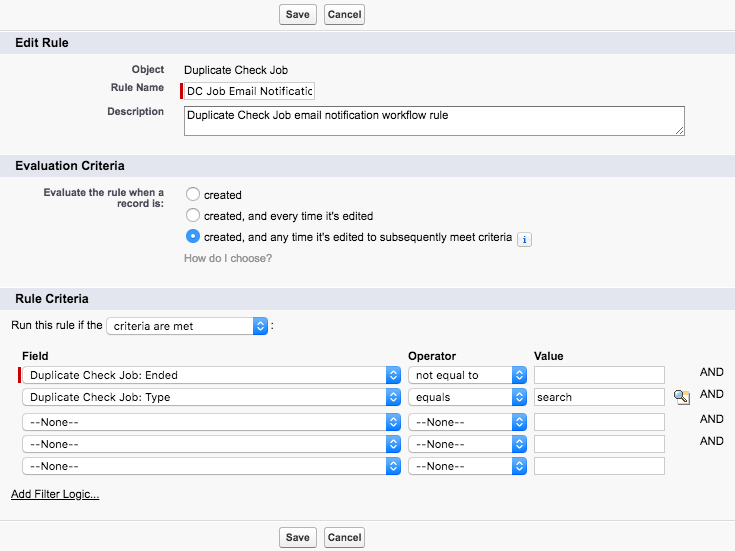Click Save or Save & Next.
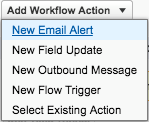
At "Specify Workflow Actions", click Add Workflow Action and select “New Email Alert”.
At "New Email Alert", enter the following:
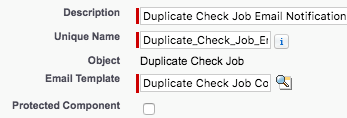
Description: “Plauti Deduplicate Job Email Notification”
Email Template: switch to Lightning and Public Email Templates, and select the template you created in step 1: "Deduplicate Job Completed"
Protected Component: leave unchecked
Recipients: Move the user that should receive the email notification to the Selected Recipients column. If needed, add more email addresses in the "Additional Emails" field.Click Save and then Done.
You will be redirected to the Workflow rule overview page
At the newly added Workflow Rule, click Activate.
Now, each time a Deduplicate Job is finished, you will receive an email notification. This applies to individual runs of Scheduled Jobs as well.