

Enable asynchronous form handlers
Last updated
To make sure you can use Duplicate Check for Dynamics 365 everywhere, enable "asynchronous form handlers" for each app that uses forms that can edit or save entities where you want duplicates detected.
Enable asynchronous form handlers
Go to the Apps overview. For each app that uses forms that can edit or save one or more entities where you want to use Duplicate Check, do the following:
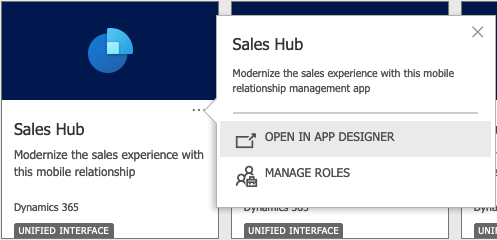
At the app, click "…" and select Open In App Designer
At top left, go to Settings

In the Settings window, go to **Features
**
Turn on
Async onload handler
Async save handler
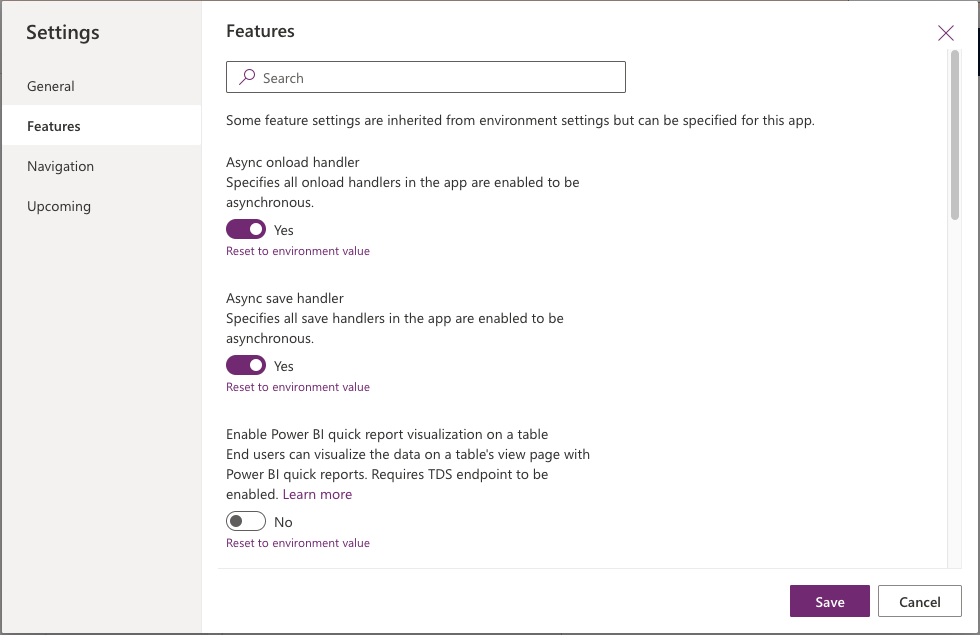
Click Save
After saving, at top right, click **Publish

Repeat for all apps that use forms that can edit or save one or more entities where you want to use Duplicate Check for Dynamics 365.